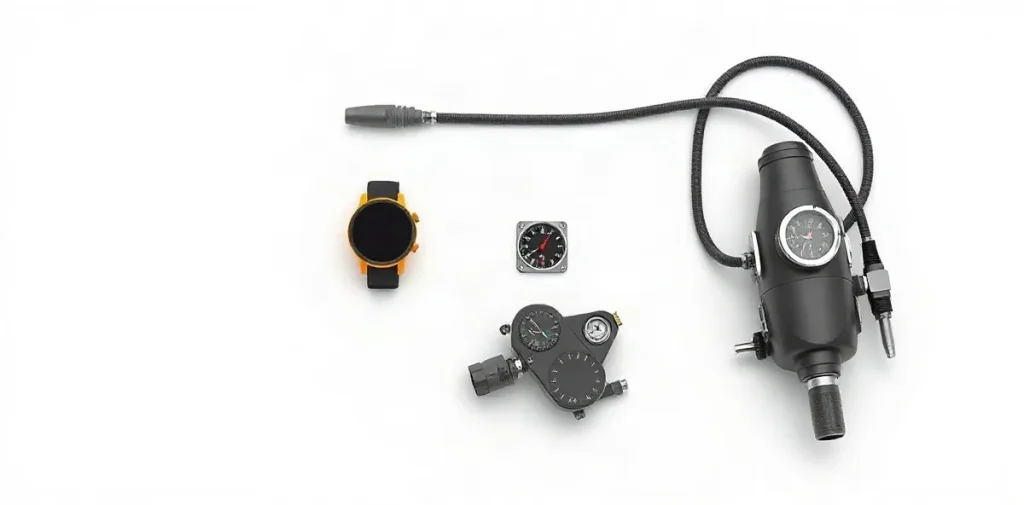
A wrist-mounted dive computer suits most divers best; console and hose-mounted models are alternatives when you prefer your information integrated with other gear.
The right format depends on how you want to see and handle your dive data. A wrist unit is easy to check at a glance, while console and hose-mounted designs keep the computer with equipment you already carry. Each can work well, provided you can read and use it comfortably underwater.
This guide to dive computers compares wrist, console, and hose configurations, focusing on practical trade-offs to help you choose a setup that fits your diving.
| Mount | Display arrangement | Kit connection | Main trade-off |
|---|---|---|---|
| Wrist | On the arm | Separate from SPG and compass | Instruments are not grouped |
| Console | Computer grouped with instruments | Can include SPG and compass | Cluster and hose must be manageable |
| Hose-mounted | Attached by hose | High-pressure port on first stage | Requires compatible port and routing |
- 38.2% Europe’s share of global wrist dive computer market revenue in 2024
- 54.5% Global wrist dive computer market share for non-air-integrated computers in 2024
- $53.50 Listed price for a wrist model and hose mount
- 3 gauges Gauge count in the described navigational console
How do wrist, console and hose-mounted dive computers differ?
Wrist, console and hose-mounted dive computers differ in where they sit and how they connect: wrist models go on the arm, consoles group instruments together, and hose-mounted models connect to a high-pressure port on the first stage. These are mounting arrangements, not different methods of measuring depth or dive time.
- Wrist: The computer sits on the diver’s arm, separate from the SPG and compass. This keeps the display apart from those instruments rather than grouping them at one viewing point.
- Console: The computer sits with instruments such as an SPG and compass in a shared console. That layout brings depth, dive time and compass bearing together for viewing.
- Hose-mounted: A hose connects the computer to a high-pressure port on the first stage, as with a pressure gauge. Its position is therefore tied to the regulator’s first stage rather than the diver’s wrist.
Console and wrist arrangements involve a practical trade-off: a console groups instruments, while a wrist unit keeps the computer display separate. A listed wrist model and hose mount costs $53.50, but that price alone does not establish a like-for-like comparison across mounting styles. Choose by considering where you want the display and whether you prefer the computer alongside the SPG and compass.
Which mount makes the display easiest to check?
A wrist-mounted computer is easiest to check when you can turn your arm into view; a console keeps the computer, SPG and compass together, making the instruments easier to locate as a group. Which feels more accessible depends on where each display sits in your actual kit configuration.
- Wrist: Turn your arm to bring the computer into view, without lifting a console from your side.
- Console: The computer, SPG and compass are grouped in one place, so you need not search for separate instruments.
A console’s grouping does not replace reading each instrument: check the computer’s relevant display, then verify the SPG or compass value you need. Being side by side helps with locating the instruments, but each still has its own information to interpret.
Check the setup you will use
Before choosing, compare the display positions in your existing configuration: where the wrist computer sits when your arm turns, or where the console rests relative to your side. A hose-mounted computer connects to a high-pressure port on the first stage, like a pressure gauge, so consider that hose’s position in the assembled kit as well.
How should snag risk and hose routing affect the choice?
A wrist-mounted dive computer avoids adding a computer hose to the first-stage setup, while a hose-mounted computer adds a connection at a high-pressure port and must suit the diver’s regulator configuration. Choose by considering the extra hose and connection—not by assuming that one mounting style is snag-proof.
- Wrist: Keeps the computer off the first-stage hose routing, though other equipment can still snag.
- Hose-mounted: Connects at a high-pressure port on the first stage, so check that the port and hose arrangement fit the regulator.
- Console: Brings instruments together on a hose; consider where the bundle hangs and whether it can be secured without obstructing access.
A console can group a dive computer with a submersible pressure gauge and compass for viewing in one place. That convenience also makes the position and restraint of the instrument bundle part of the routing decision; inspect how it sits alongside the diver’s other equipment.
These mounting descriptions identify different hose and equipment layouts, but they do not establish that a wrist unit, hose mount, or console is immune to snags. Assess the actual regulator configuration and how each setup lies and can be secured before choosing.
How do mounting choices work with an SPG, compass and backup?
A console can group a dive computer, SPG and compass in one instrument cluster, while a wrist computer leaves the SPG and compass in their existing positions. The choice is therefore whether to consolidate instruments or keep the computer separate—not whether one arrangement provides a backup.
- Console: The computer, SPG and compass can sit together for viewing. Before diving, check that the SPG is still easy to reach and read with the console or its hose routed in its intended position.
- Wrist: The computer is worn separately, so the SPG and compass do not need to share its mount. Check that both remain accessible and readable in their usual locations.
Plan the backup separately
A shared console is one instrument cluster, not a backup instrument. Decide separately whether your kit includes a backup and where it will be carried, so it can be accessed independently of the primary console or hose-mounted computer.
When can a console or hose setup be the wrong fit?
A console or hose-mounted dive computer can be the wrong fit when its hardware is awkward with your equipment: a console may be hard to bring into view, while a hose mount may not suit your first stage or hose routing. The right choice depends on how the computer, compass and SPG work with the rest of your kit.
- Console: A console groups the computer with instruments such as the compass and SPG, but that arrangement is less convenient if you struggle to lift the console into view or manage it alongside other equipment.
- Hose mount: This setup connects the computer to a high-pressure port on the first stage, like a pressure gauge. It is a poor fit if the required connection is unavailable or the hose route conflicts with your regulator setup.
- Wrist mount: A wrist computer can be less convenient if you prefer the compass, SPG and computer together in one console.
Check the price listing carefully
The listed $53.50 price is for a wrist model and hose mount in one product listing. It is not a like-for-like comparison of wrist, console and hose mounting options, so use it only for the product described—not as a price ranking across all three setups.
What does the 2024 wrist-computer market figure tell divers?
The 2024 market figures describe where revenue came from and which product type held the larger share; they do not show that wrist mounting is safer or more readable than a console. Transparency Market Research reports that Europe accounted for 38.2% of global wrist dive computer market revenue in 2024.
The same market summary puts non-air-integrated computers at 54.5% of the global wrist dive computer market in 2024. That figure describes product category, not mounting format: it cannot by itself tell divers whether a wrist computer or a console is easier to read underwater.
Market share is not a mounting comparison
A navigational console is a separate equipment configuration: one listing describes a three-gauge console with a flexible hose. That listing identifies the setup, but it does not establish that consoles outperform wrist computers; the market figures likewise offer no direct comparison of safety or readability.
FAQ
Are wrist or console dive computers better?
What is a hose-mounted dive computer?
Are console dive computers cheaper?
Does a console replace a backup instrument?
What this piece draws on
- scubaboard.com — “Dive Computer wrist mount or console”
- panamacitydiving.com — “Scuba Diving Computers”
- What You Need to Know — “Wrist vs. Console Dive Computers”
- scubadiverlife.com — “Wrist or Console Dive Computers”
- diversdirect.com — “Dive Console Computers”